Showing posts with label Overview of SQL Server 2005 and 2008 Table Indexing. Show all posts

Wednesday, 25 January 2012

Using Indexed Computed Columns to Improve Performance

Using Indexed Computed Columns to Improve Performance


I recently read a blog post on doing case-insensitive text searches on SQL Server 2005. The post said that an index on a computed column might be used even if the computed column itself wasn't used in the WHERE clause. I was curious to test that and see how far I might take it. Years ago I worked on a case-sensitive application and I vividly remember all the headaches that caused me. I was also curious to see if I could use that for datetime columns to strip off the time portion and easily do a "date-only" search.
I started with a copy of a table from AdventureWorks.
USE [AdventureWorks]
GO
IF EXISTS (SELECT 1 FROM INFORMATION_SCHEMA.TABLES 
   WHERE TABLE_NAME = 'NewContact'
   AND TABLE_SCHEMA = 'Person')
 DROP TABLE [Person].[NewContact]
GO
CREATE TABLE [Person].[NewContact]  (
 [ContactID] [int] PRIMARY KEY NOT NULL,
 [Title] [nvarchar](8) COLLATE SQL_Latin1_General_CP1_CS_AS NULL,
 [FirstName] nvarchar(50) COLLATE SQL_Latin1_General_CP1_CS_AS NOT NULL,
 [LastName] nvarchar(50) COLLATE SQL_Latin1_General_CP1_CS_AS NOT NULL,
 [Suffix] [nvarchar](10) COLLATE SQL_Latin1_General_CP1_CS_AS NULL,
 [EmailAddress] [nvarchar](50) COLLATE SQL_Latin1_General_CP1_CS_AS NULL,
 [ModifiedDate] [datetime] NOT NULL  DEFAULT (getdate())  )
GO
INSERT INTO [Person].[NewContact] ( [ContactID], [Title], [FirstName],
 [LastName], [Suffix], [EmailAddress], [ModifiedDate] )
select ContactID, Title, FirstName, LastName, Suffix, EmailAddress, 
 ModifiedDate = DATEADD(mi, ContactID, ModifiedDate)
FROM Person.Contact
GO
CREATE INDEX IX_NewContact_LastName ON Person.NewContact(LastName);
GO
CREATE INDEX IX_NewContact_ModifiedDate ON Person.NewContact(ModifiedDate) 
GO
This creates a copy of the contacts table with all the NVARCHAR columns set to case-sensitive. It also creates indexes on the LastName column and DateModified column. I tested a series of SELECT statements against the table to establish a baseline.
The SELECT statements and the results are:


Statement Base index Upper Index CI Index
1. SELECT * FROM Person.NewContact WHERE LastName = 'Mcanich' Index seek, query cost = 0.007, returned one row Index seek, query cost = 0.007, returned one row Index seek, query cost = 0.007, returned one row
2. SELECT * FROM Person.NewContact WHERE LastName = 'mcanich' Index seek, query cost = 0.007, returned zero rows Index seek, query cost = 0.007, returned zero rows Index seek, query cost = 0.007, returned zero rows
3. SELECT * FROM Person.NewContact WHERE LastName = 'MCANICH' COLLATE SQL_Latin1_General_CP1_CI_AI Index scan, query cost = .127, returned one row Index scan, query cost = 0.129, returned one row Index seek of CI index, query cost = 0.007, returned one row
4. SELECT * FROM Person.NewContact WHERE UPPER(LastName) = UPPER('McAnich') Index scan, query cost = 0.08, returned one row Index seek of "Upper" index, query cost = 0.007, returned one row Index seek of "Upper" index, query cost = 0.007, returned one row
5. SELECT * FROM Person.NewContact WHERE LastNameUpper = UPPER('McAnich') (Failed) Index seek of "Upper" index, query cost = 0.007, returned one row Index seek of "Upper" index, query cost = 0.007, returned one row
6. SELECT * FROM Person.NewContact WHERE LastNameCI = 'mcanICh' (Failed) (Failed) Index seek of CI index, query cost = 0.007, returned one row
The first set of tests is in the "Base Index" column. When I compared the column to a scalar value it did an index seek (1 and 2). Query #3 specified a case-insensitive search using the COLLATE clause and that resulted in an very slow index scan. Query #4 converted them both to upper case and then compared them. This also resulted in a query scan but not nearly as bad. Still this had a cost ten times higher than the base query. One of the things I discuss in my performance tuning presentations is that any time you wrap a function around an indexed column it probably won't use the index efficiently. This seems to confirm that.
Next I created a computed column with the UPPER function and then built an index on it.
ALTER TABLE Person.NewContact
  ADD LastNameUpper AS UPPER(LastName)
GO
CREATE INDEX IX_NewContact_LastNameUpper ON Person.NewContact(LastNameUpper)
GO
 
The results of this are in the "Upper Index" column above. In Query #5 when we use the computed column it does an index seek on the new index just like I'd hoped it would. The really interesting result is Query #4. That also uses the new index and does an index seek even though we aren't using the new computed column. What the blog post says and what seems to be happening is that SQL Server is checking for a computed column that matches the WHERE clause. It finds it, finds that it's indexed and uses the index. Pretty cool if you ask me!
I also tested this by creating a case-insensitve computed column and testing that.
ALTER TABLE Person.NewContact
  ADD LastNameCI AS LastName COLLATE SQL_Latin1_General_CP1_CI_AI
GO
CREATE INDEX IX_NewContact_LastNameCI ON Person.NewContact(LastNameCI)
GO   
The results of this test are in the "CI Index" column in the table above. This performed just like the other computed column. Query #6 which explicitly used the column performed very well. But so did Query #3 which didn't explicitly use the new column.
I also wanted to test this on datetime functions to see if I could easily query just on the date portion of the column. The queries I tested are:


Statement Base index Date Only Index
1. SELECT * FROM Person.NewContact WHERE ModifiedDate >= '5/1/2003' AND ModifiedDate < '5/2/2003' Index seek, query cost = 0.03, eleven rows returned Index seek, query cost = 0.03, eleven rows returned
2. SELECT * FROM Person.NewContact WHERE ModifiedDate = '5/1/2003' Index seek, query cost = 0.006, zero rows returned Index seek, query cost = 0.006, zero rows returned
3. SELECT * FROM Person.NewContact WHERE CONVERT(VARCHAR(10), ModifiedDate, 101) = '05/01/2003' Index scan, query cost = 0.07, eleven rows returned Index scan, query cost = 0.07, eleven rows returned
4. SELECT * FROM Person.NewContact WHERE CONVERT(DATETIME, CONVERT(VARCHAR(10), ModifiedDate, 101), 101) = '5/1/2003' Index scan, query cost = 0.07, eleven rows returned Index seek on new index, query cost = 0.04, eleven rows returned
5. SELECT * FROM Person.NewContact WHERE ModifiedDateOnly = '5/1/2003' (Failed) Index seek on new index, query cost = 0.04, eleven rows returned
6. SELECT * FROM Person.NewContact WHERE CAST(CONVERT(VARCHAR(10), ModifiedDate, 101) AS DATETIME) = '5/1/2003' Index scan, query cost = 0.07, eleven rows returned Index scan, query cost = 0.07, eleven rows returned
7. SELECT * FROM Person.NewContact WHERE CONVERT(DATETIME, CONVERT(VARCHAR(10), ModifiedDate, 101)) = '5/1/2003' Index scan, query cost = 0.07, eleven rows returned Index scan, query cost = 0.07, eleven rows returned
Notice that in the script that created the NewContact table I added some minutes to each ModifiedDate. I also created an index on ModifiedDate. The first query is the preferred way of selecting one days worth of data. It does an index seek and is the fastest way to return data. The second query is a little faster but doesn't return any data. The comparison of a date-only value to a date with time value with always fail. The third query is the way I see this type of query written most frequenty. The column is converted to VARCHAR and then compared to the value. In the fourth query the column is converted back to datetime.
Next I added a computed column and an index on that column.
ALTER TABLE Person.NewContact
 ADD ModifiedDateOnly AS CONVERT(DATETIME, CONVERT(VARCHAR(10), ModifiedDate, 101), 101) 
GO
CREATE INDEX XI_NewContact_ModifiedDateOnly ON Person.NewContact(ModifiedDateOnly)
GO
This created a computed column that had the time removed from ModifiedDate. When I converted back to DATETIME I had to specifiy the format number (101) or SQL Server complained that the function wasn't deterministic. Deterministic functions always return the same value from the same input value and database state. For example, GETDATE() isn't deterministic.
The biggest improvement came in Query #4. Since the function around ModifiedDate matched the computed column it used the computed column and its index. It didn't use it in Query #6 where the outer CONVERT was replaced with a CAST function. When test Query #4 but added a bunch of white space into the WHERE clause it still used the index. That tells it isn't doing a simple hash of the text in the WHERE clause. When I changed from VARCHAR(10) to any other length it no longer used the new index. Query #7 also didn't use the new index. The only difference in that query was the outer CONVERT function didn't have a format number.
If you have existing application code that wraps functions around an indexed column and then doesn't use the index you may be able to use this approach to improve those queries. If the functions are consistent you should be able to add computed columns and realize immediate benefits.


  Post By Bill Graziano


Sunday, 22 January 2012

Overview of SQL Server 2005 and 2008 Table Indexing

1. Overview

Human needs have increased tremendously. Now people are doing much more composite tasks than ever before. The society has become very complex, a person has to work with huge amount of information every day. In order to work with the enormous information, we must have a system where we can store, manipulate and share the information all over the world. It is one of the core reasons for introducing Database Management Systems (DBMS) as well as Relational Database Management Systems (RDBMS) now-a-days.
So, one thing is clear to us that we store and manipulate data / information into a database, where the database contains various types of tables for storing various types of data / information.
Developers can create tables of a database; it would be possible to stop at this point and just start working with our data from here. However this would not be one of our best choices, but why? Because it is not really a good idea for better performances, let’s take an example:
“A library has a huge collection of books, files, etc... A student requests the librarian for a book of Microsoft SQL Server 2008, if we think without an index the librarian had to find this without any help s/he has to search one by one! Which must be time consuming; so with a proper arrangement, that is with the help of an index, it very much easier and faster to find out the desired one.”
There are many ways to create an index, but first of all we need to know what is an index is and how it is held within SQL Server.

2. What is an Index?

A SQL table explanation is not good enough for getting the desired data very quickly or sorting the data in a specific order. What we actually need for doing this is some sort of cross reference facilities where for certain columns of information within a table, it should be possible to get whole records of information quickly. But if we consider a huge amount of data in a table, we need some sort of cross reference to get to the data very quickly. This is where an index within SQL Server comes in.
So an index can be defined as:
  • “An index is an on-disk structure associated with a table or views that speed retrieval of rows from the table or view. An index contains keys built from one or more columns in the table or view”. These keys are stored in a structure (B-tree) that enables SQL Server to find the row or rows associated with the key values quickly and efficiently.”
  • “An index is a database object created and maintained by DBMS. It is essentially a list of the contents of a column or group of columns. Indexes are ordered so that extremely first search can be computed through them to find data.” 

3. Why Use an Index?

Use of SQL server indexes provide many facilities such as:
  • Rapid access of information
  • Efficient access of information
  • Enforcement of uniqueness constraints
Correct use of indexes can make the difference between a top performing database with high customer satisfaction and a non-performing database with low customer satisfaction.

4. Types of Indexes

SQL Server has two major types of indexes:
  1. Clustered 
  2. Non-Clustered
The index type refers to the way the index is stored internally by SQL Server. So a table or view can contain the two types of indexes.

4.1 Clustered

An index defined as being clustered, defines the physical order that the data in a table is stored. Only one cluster can be defined per table. So it can be defined as:
  • Clustered indexes sort and store the data rows in the table or view based on their key values. These are the columns included in the index definition. There can be only one clustered index per table, because the data rows themselves can be sorted in only one order.
  • The only time the data rows in a table are stored in sorted order is when the table contains a clustered index. When a table has a clustered index, the table is called a clustered table. If a table has no clustered index, its data rows are stored in an unordered structure called a heap.

4.2 Non-Clustered

As a non-clustered index is stored in a separate structure to the base table, it is possible to create the non-clustered index on a different file group to the base table. So it can be defined as:
  • Non-Clustered indexes have a structure separate from the data rows. A non-clustered index contains the non-clustered index key values and each key value entry has a pointer to the data row that contains the key value.
  • The pointer from an index row in a non-clustered index to a data row is called a row locator. The structure of the row locator depends on whether the data pages are stored in a heap or a clustered table. For a heap, a row locator is a pointer to the row. For a clustered table, the row locator is the clustered index key.
  • You can add nonkey columns to the leaf level of the Non-Clustered index to by-pass existing index key limits, 900 bytes and 16 key columns, and execute fully covered, indexed, queries.
More information about indexes can be found at this link.
Both clustered and non-clustered indexes can be unique. This means no two rows can have the same value for the index key. Otherwise, the index is not unique and multiple rows can share the same key value.
Note: Indexes are automatically maintained for a table or view whenever the table data is modified.

5. Uniqueness

An index can be defined either as unique or non-unique. A unique index ensures that the data contained within the unique index columns appear only once within the table, including “NULL”. A unique index is commonly implemented to support the constraints.
SQL Server automatically enforces the uniqueness of the columns contained within a unique index. If an attempt is made to INSERT a value/data that already exists in the table, then an error will be generated by the SQL Server and finally the attempt to INSERT the data will fail.
A non-unique index is also applicable as there can be duplicate data; a non-unique index has more overhead than a unique index when retrieving data.

6. Creating a Table

What is a table? The foundation of every Relational Database Management System is a database object called table. Every database consists of one or more tables, which stores the database’s data/information. Each table has its own unique name and consists of columns and rows.
Syntax of Creating Table
CREATE TABLE 
    [ database_name.[ owner ] . | owner. ] table_name 
    ( { < column_definition > 
        | column_name AS computed_column_expression 
        | < table_constraint > } [ ,...n ] 
    ) 
In this article, we will not discuss database tables. I hope that every one knows the basic concepts about database tables.
More information about database tables can be found at:

7. Creating an Index

As we discuss what an index is, why we use an index, types of indexes, etc, we are going to discuss how to create an index. There are two ways of creating an index they are as follows:
  • Creating an Index using SQL Server Table Designer
  • Creating an Index using Transact-SQL
7.1 Creating an Index using by SQL Server Table Designer
SQL Server Table designer is an excellent feature to manage various tables designing creation, modification, indexing and so much more. Here you need to follow the step(s) below to create an index using the SQL Table designer.

Step(s)

  1. Open your SQL Server Enterprise Management Studio and choose your database for creating a table index. Now select your desired table and open the Table Design window. The following figure shows how to do this. Image1
    Figure 1 (How to open SQL Table Designer)
  2. A window will appear where you will find all the available inputs for creating a Table. You just need to input the columns name, data type length and also you may set the columns to allow null value or not. Note that you can set a default value of a column. The following figure will show you how you can perform all of this:
    Figure 2 (How to set table columns, data type, length, etc.)
  3. Well, now you know how to create a table. Let's see how to set an index in a table. Select the column by clicking your mouse button, a new popup menu will appear, select/click the Indexes/Keys for opening a new window where you can configure the columns for indexing. The following figure will show how to set an index.
    Figure 2.1 (A) (How to configure an Index)
    Image 2.1 B
    Figure 2.1 (B) (How to Configure an Index)
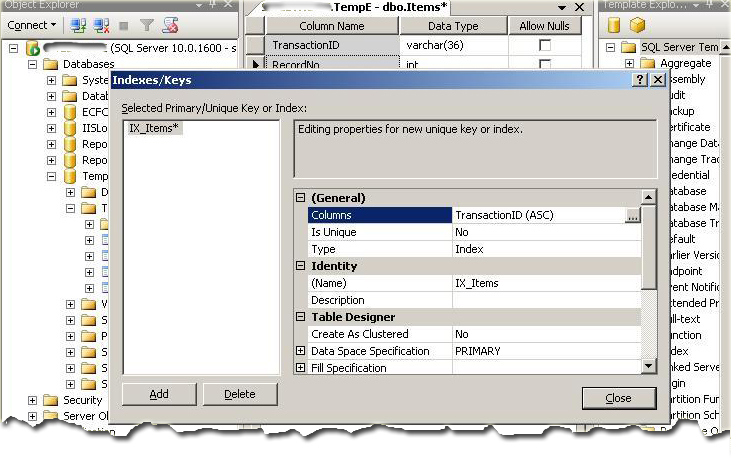
  4. Now you just select the column from the general properties as shown in figure 3, and add the specify column short order of the index.
    Figure 4 (How to set a Clustered Index)
    You can configure the index as clustered or non-clustered from the Create as clustered properties. Figure 4 shows the configuration of clustered or non-clustered indexes by default.
So we discussed how to create an index by using SQL Server Table Designer. Let’s try to create an index by using Transact-SQL.
7.2 Creating an Index – Transact-SQL
If we want to create an index by using Transact – SQL , we must know the columns detail for index creation. A sample syntax is given below.
Syntax
CREATE INDEX <index_type> <index_name> ON <table_name> (
<column_name1> <index_order>,
<column_name2> <index_order>,
)  
 
CREATE UNIQUE INDEX <index_type> <index_name> ON <table_name> (
<column_name1> <index_order>,
<column_name2> <index_order>,
) 
7.3 Drop an Index
Removes one or more indexes from the current database.
The DROP INDEX statement does not apply to indexes created by defining PRIMARY KEY or UNIQUE constraints (created by using the PRIMARY KEY or UNIQUE options of either the CREATE TABLE or ALTER TABLE statements, respectively). For more information about PRIMARY or UNIQUE KEY constraints, see "CREATE TABLE" or "ALTER TABLE" in this volume.
Syntax
DROP INDEX 'table.index | view.index' [ ,...n ] 
More information about drop indexes can be found at this link.

8. Index and Statistics

When retrieving data, SQL Server obviously has to make some decisions as to the best way to get to data and return it to the query requesting it. So SQL Server has some basic information to make sensible and accurate choices. This is where statistics comes in. SQL Server keeps statistics on each column, which are updated over a period of time and over a number of inserts or modifications.
More information about indexes and statistics can be found at this link.

9. Summary

In this article, I tried to cover SQL table indexing. I discussed why we use indexes and how they are used to quick and efficiently retrieve the data stored in the table. I also discussed various types of indexes, how to create / drop index, index uniqueness and index statistics as well.
I hope that this article will be helpful to you. Enjoy!

10. References

  • SQL Server books online
  • Microsoft Development Network (MSDN)
  • SQL Server programming by Robin