Tuesday, 22 November 2011

Top 10 steps to optimize data access in SQL Server: Part II (Re-factor TSQL and apply best practices)

Introduction


Remember we were in a mission? Our mission was to optimize the performance of a SQL Server database. We had an application that was built on top of that database. The application was working pretty fine while testing, but soon after deployment at production, it started to perform slowly as the data volume increased in the database. Within a few months, the application started performing so slowly that the poor developers (including me) had to start this mission to optimize the database and thus, optimize the application.
Please have a look at the previous article to know how it started and what we did to start the optimization process:
Well, in the first 3 steps (discussed in the previous article), we implemented indexing in our database. That was because we had to do something that improved the database performance in a quick amount of time, with the least amount of effort. But, what if our data access code was written in an inefficient way? What if our TSQLs were written poorly?
Applying indexing will obviously improve data access performance, but at the most basic level, in any data access optimization process, you have to make sure that you have written your data access code and TSQLs in the most efficient manner, applying the best practices.
So, in this article, we are going to focus on writing or refactoring data access code using the best practices. But, before we start playing the game, we need to prepare the ground first. So let's do the groundwork in this very next step:

Step 4: Move TSQL code from the application into the database server

I know you may not like this suggestion at all. You might have used an ORM that generates all the SQL for you on the fly. Or, you or your team might have a "principle" of keeping SQL in your application code (in the Data Access Layer methods). But still, if you need to optimize data access performance, or if you need to troubleshoot a performance problem in your application, I would suggest you move your SQL code into your database server (using Stored Procedures, Views, Functions, and Triggers) from your application. Why? Well, I do have some strong reasons for this recommendation:
  • Moving SQL from application and implementing them using Stored Procedures/Views/Functions/Triggers will enable you to eliminate any duplicate SQL in your application. This will also ensure re-usability of your TSQL codes.
  • Implementing all TSQL using database objects will enable you to analyze the TSQLs more easily to find possible inefficient codes that are responsible for the slow performance. Also, this will let you manage your TSQL codes from a central point.
  • Doing this will also enable you to re-factor your TSQL codes to take advantage of some advanced indexing techniques (going to be discussed in the later parts in this series of articles). This will also help you to write more "Set based" SQLs along with eliminating any "Procedural" SQLs that you might have already written in your application.
Despite the fact that indexing (in Step 1 to Step 3) will let you troubleshoot performance problems in your application in a quick time (if properly done), following step 4 might not give you a real performance boost instantly. But, this will mainly enable you to perform other subsequent optimization steps and apply other techniques easily to further optimize your data access routines.
If you have used an ORM (say, NHibernate) to implement the data access routines in your application, you might find your application performing quite well in your development and test environment. But if you face performance problems in a production system where lots of transactions take place each second, and where too many concurrent database connections are there, in order to optimize your application's performance, you might have to re-think about your ORM based data access logic. It is possible to optimize an ORM based data access routine, but, it is always true that if you implement your data access routines using TSQL objects in your database, you have the maximum opportunity to optimize your database.
If you have come this far while trying to optimize your application's data access performance, come on, convince your management and get some time to implement a TSQL object based data operational logic. I can promise you, spending one or two man-months doing this might save you a man-year in the long run!
OK, let's assume that you have implemented your data operational routines using TSQL objects in your database. Having done this step, you are done with the "ground work" and ready to start playing. Let's move towards the most important step in our optimization adventure. We are going to re-factor our data access code and apply best practices.

Step 5: Identify inefficient TSQL, re-factor, and apply best practices

No matter how good indexing you apply to your database, if you use poorly written data retrieval/access logic, you are bound to get slow performance.
We all want to write good code, don't we? While we write data access routines for a particular requirement, we really have lots of options to follow for implementing a particular data access routine (and the application's business logic). But, in most cases, we have to work in a team with members of different caliber, experience, and ideologies. So, while at development, there are strong chances that our team members may write code in different ways, and some of them will skip best practices. While writing code, we all want to "get the job done" first (most of the time). But when our code runs in production, we start to see the problems.
Time to re-factor the code now. Time to implement the best practices in your code.
I have some SQL best practices for you that you can follow. But I am sure that you already know most of them. Problem is, in reality, you just don't implement these good stuff in your code (of course, you always have some good reasons for not doing so). But what happens at the end of the day? Your code runs slowly, and your client becomes unhappy.
While you should know that best practices alone is not enough, you have to make sure that you follow the best practices while writing TSQL. This is the most important thing to remember.

Some TSQL Best Practices

Don't use "SELECT*" in a SQL query
  • Unnecessary columns may get fetched that will add expense to the data retrieval time.
  • The database engine cannot utilize the benefit of "Covered Index" (discussed in the previous article), and hence the query performs slowly.
Avoid unnecessary columns in the SELECT list and unnecessary tables in join conditions
  • Selecting unnecessary columns in a Select query adds overhead to the actual query, specially if the unnecessary columns are of LOB types.
  • Including unnecessary tables in join conditions forces the database engine to retrieve and fetch unnecessary data and increases the query execution time.
Do not use the COUNT() aggregate in a subquery to do an existence check
  • Do not use:
  • SELECT column_list FROM table WHERE 0 < (SELECT count(*) FROM table2 WHERE ..)
    Instead, use:
    SELECT column_list FROM table WHERE EXISTS (SELECT * FROM table2 WHERE ...)
  • When you use COUNT(), SQL Server does not know that you are doing an existence check. It counts all matching values, either by doing a table scan or by scanning the smallest non-clustered index.
  • When you use EXISTS, SQL Server knows you are doing an existence check. When it finds the first matching value, it returns TRUE and stops looking. The same applies to using COUNT() instead of IN or ANY.
Try to avoid joining between two types of columns
  • When joining between two columns of different data types, one of the columns must be converted to the type of the other. The column whose type is lower is the one that is converted.
  • If you are joining tables with incompatible types, one of them can use an index, but the query optimizer cannot choose an index on the column that it converts. For example:
  • SELECT column_list FROM small_table, large_table WHERE
    smalltable.float_column = large_table.int_column 
    In this case, SQL Server converts the integer column to float, because int is lower in the hierarchy than float. It cannot use an index on large_table.int_column, although it can use an index on smalltable.float_column.
Try to avoid deadlocks
  • Always access tables in the same order in all your Stored Procedures and triggers consistently.
  • Keep your transactions as short as possible. Touch as few data as possible during a transaction.
  • Never, ever wait for user input in the middle of a transaction.
Write TSQL using "Set based approach" rather than "Procedural approach"
  • The database engine is optimized for Set based SQL. Hence, Procedural approach (use of Cursor or UDF to process rows in a result set) should be avoided when large result sets (more than 1000) have to be processed.
  • How can we get rid of "Procedural SQL"? Follow these simple tricks:
    • Use inline sub queries to replace User Defined Functions.
    • Use correlated sub queries to replace Cursor based code.
    • If procedural coding is really necessary, at least, use a table variable instead of a cursor to navigate and process the result set.
For more info on "set" and "procedural" SQL, see Understanding "Set based" and "Procedural" approaches in SQL.
Try not to use COUNT(*) to obtain the record count in a table
  • To get the total row count in a table, we usually use the following Select statement:
  • SELECT COUNT(*) FROM dbo.orders
    This query will perform a full table scan to get the row count.
  • The following query would not require a full table scan. (Please note that this might not give you 100% perfect results always, but this is handy only if you don't need a perfect count.)
  • SELECT rows FROM sysindexes 
    WHERE id = OBJECT_ID('dbo.Orders') AND indid < 2
Try to avoid dynamic SQL
Unless really required, try to avoid the use of dynamic SQL because:
  • Dynamic SQL is hard to debug and troubleshoot.
  • If the user provides the input to the dynamic SQL, then there is possibility of SQL injection attacks.
Try to avoid the use of temporary tables
  • Unless really required, try to avoid the use of temporary tables. Rather use table variables.
  • In 99% of cases, table variables reside in memory, hence it is a lot faster. Temporary tables reside in the TempDb database. So operating on temporary tables require inter database communication and hence will be slower.
Instead of LIKE search, use full text search for searching textual data
Full text searches always outperform LIKE searches.
  • Full text searches will enable you to implement complex search criteria that can't be implemented using a LIKE search, such as searching on a single word or phrase (and optionally, ranking the result set), searching on a word or phrase close to another word or phrase, or searching on synonymous forms of a specific word.
  • Implementing full text search is easier to implement than LIKE search (especially in the case of complex search requirements).
  • For more info on full text search, see http://msdn.microsoft.com/en-us/library/ms142571(SQL.90).aspx
Try to use UNION to implement an "OR" operation
  • Try not to use "OR" in a query. Instead use "UNION" to combine the result set of two distinguished queries. This will improve query performance.
  • Better use UNION ALL if a distinguished result is not required. UNION ALL is faster than UNION as it does not have to sort the result set to find out the distinguished values.
Implement a lazy loading strategy for large objects
  • Store Large Object columns (like VARCHAR(MAX), Image, Text etc.) in a different table than the main table, and put a reference to the large object in the main table.
  • Retrieve all the main table data in a query, and if a large object is required to be loaded, retrieve the large object data from the large object table only when it is required.
Use VARCHAR(MAX), VARBINARY(MAX), and NVARCHAR(MAX)
  • In SQL Server 2000, a row cannot exceed 8000 bytes in size. This limitation is due to the 8 KB internal page size of SQL Server. So to store more data in a single column, you need to use TEXT, NTEXT, or IMAGE data types (BLOBs) which are stored in a collection of 8 KB data pages.
  • These are unlike the data pages that store other data in the same table. These pages are arranged in a B-tree structure. These data cannot be used as variables in a procedure or a function, and they cannot be used inside string functions such as REPLACE, CHARINDEX, or SUBSTRING. In most cases, you have to use READTEXT, WRITETEXT, and UPDATETEXT.
  • To solve this problem, use VARCHAR(MAX), NVARCHAR(MAX), and VARBINARY(MAX) in SQL Server 2005. These data types can hold the same amount of data BLOBs can hold (2 GB), and they are stored in the same type of data pages used for other data types.
  • When data in a MAX data type exceeds 8 KB, an over-flow page is used (in the ROW_OVERFLOW allocation unit), and a pointer to the page is left in the original data page in the IN_ROW allocation unit.
Implement the following good practices in User Defined Functions
  • Do not call functions repeatedly within your Stored Procedures, triggers, functions, and batches. For example, you might need the length of a string variable in many places of your procedure, but don't call the LEN function whenever it's needed; instead, call the LEN function once, and store the result in a variable for later use.
Implement the following good practices in Stored Procedures
  • Do not use "SP_XXX" as a naming convention. It causes additional searches and added I/O (because the system Stored Procedure names start with "SP_"). Using "SP_XXX" as the naming convention also increases the possibility of conflicting with an existing system Stored Procedure.
  • Use "Set Nocount On" to eliminate extra network trip.
  • Use the WITH RECOMPILE clause in the EXECUTE statement (first time) when the index structure changes (so that the compiled version of the Stored Procedure can take advantage of the newly created indexes).
  • Use default parameter values for easy testing.
Implement the following good practices in Triggers
  • Try to avoid the use of triggers. Firing a trigger and executing the triggering event is an expensive process.
  • Never use triggers that can be implemented using constraints.
  • Do not use the same trigger for different triggering events (Insert, Update, Delete).
  • Do not use transactional code inside a trigger. The trigger always runs within the transactional scope of the code that fires the trigger.
Implement the following good practices in Views
  • Use views for re-using complex TSQL blocks, and to enable it for indexed views (Will be discussed later).
  • Use views with the SCHEMABINDING option if you do not want to let users modify the table schema accidentally.
  • Do not use views that retrieve data from a single table only (that will be an unnecessary overhead). Use views for writing queries that access columns from multiple tables.
Implement the following good practices in Transactions
  • Prior to SQL Server 2005, after BEGIN TRANSACTION and each subsequent modification statement, the value of @@ERROR had to be checked. If its value was non-zero, then the last statement caused an error, and if an error occurred, the transaction had to be rolled back and an error had to be raised (for the application). In SQL Server 2005 and onwards, the Try...Catch block can be used to handle transactions in TSQL. So try to use Try...Catch based transactional code.
  • Try to avoid nested transactions. Use the @@TRANCOUNT variable to determine whether a transaction needs to be started (to avoid nested transactions).
  • Start a transaction as late as possible and commit/rollback the transaction as fast as possible to reduce the time period of resource locking.
And, that's not the end. There are lots of best practices out there! Try finding some of them from the following URL: MSDN.
Remember, you need to implement the good things that you know; otherwise, your knowledge will not add any value to the system that you are going to build. Also, you need to have a process for reviewing and monitoring the code (that is written by your team) to see whether the data access code is being written following the standards and best practices.

How to analyze and identify scope for improvement in your TSQL?

In an ideal world, you always prevent diseases rather than cure. But, in reality, you just can't prevent always. I know your team is composed of brilliant professionals. I know you have a good review process, but still bad code is written and poor design takes place. Why? Because, no matter what advanced technology you are going to use, your client requirement will always be way much advanced, and this is a universal truth in software development. As a result, designing, developing, and delivering a system based on requirements will always be a challenging job for you.
So, it's equally important that you know how to cure. You really need to know how to troubleshoot a performance problem after it happens. You need to learn ways to analyze yout TSQL code, identify the bottlenecks, and re-factor those to troubleshoot performance problems. There are numerous ways to troubleshoot database and TSQL performance problems, but at the most basic level, you have to understand and review the execution plan of the TSQL that you need to analyze.

Understanding the query execution plan

Whenever you issue a SQL statement in the SQL Server engine, SQL Server first has to determine the best possible way to execute it. In order to carry this out, the Query Optimizer (a system that generates the optimal query execution plan before executing the query) uses several information like the data distribution statistics, index structure, metadata, and other information to analyze several possible execution plans and finally select one that is likely to be the best execution plan most of the time.
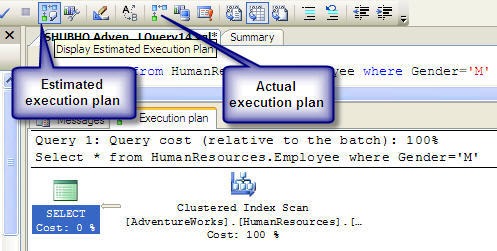
Did you know? You can use SQL Server Management Studio to preview and analyze the estimated execution plan for the query that you are going to issue. After writing the SQL in SQL Server Management Studio, click on the estimated execution plan icon (see below) to see the execution plan before actually executing the query.
(Note: Alternatively, you can switch the actual execution plan option "on" before executing the query. If you do this, Management Studio will include the actual execution plan that is being executed along with the result set in the result window.)
Estimated_execution_plan.jpg
Estimated execution plan in Management Studio

Understanding the query execution plan in detail

Each icon in the execution plan graph represents an action item (Operator) in the plan. The execution plan has to be read from right to left, and each action item has a percentage of cost relative to the total execution cost of the query (100%).
In the above execution plan graph, the first icon in the right most part represents a "Clustered Index Scan" operation (reading all primary key index values in the table) in the HumanResources table (that requires 100% of the total query execution cost), and the left most icon in the graph represents a SELECT operation (that requires only 0% of the total query execution cost).
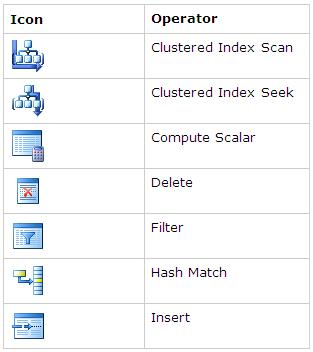
Following are the important icons and their corresponding operators you are going to see frequently in the graphical query execution plans:
QueryPlanOperators.JPG
(Each icon in the graphical execution plan represents a particular action item in the query. For a complete list of the icons and their corresponding action items, go to http://technet.microsoft.com/en-us/library/ms175913.aspx.)
Note the "Query cost" in the execution plan given above. It has 100% cost relative to the batch. That means, this particular query has 100% cost among all queries in the batch as there is only one query in the batch. If there were multiple queries simultaneously executed in the query window, each query would have its own percentage of cost (less than 100%).
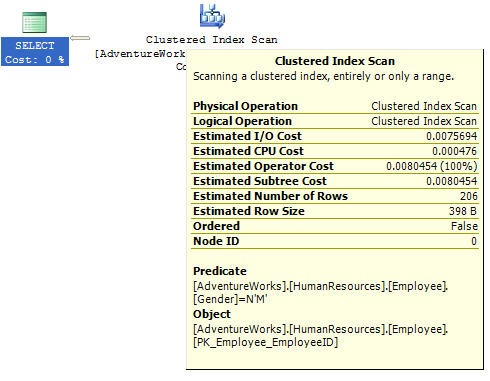
To know more details for each particular action item in the query plan, move the mouse pointer on each item/icon. You will see a window that looks like the following:
Query_plan_info.jpg
This window provides detailed estimated information about a particular query item in the execution plan. The above window shows the estimated detailed information for the clustered index scan and it looks for the row(s) which have/has Gender = 'M' in the Employee table in HumanResources schema in the AdventureWorks database. The window also shows the estimated IO, CPU, number of rows, with the size of each row, and other costs that is used to compare with other possible execution plans to select the optimal plan.
I found an article that can help you further understand and analyze TSQL execution plans in detail. You can take a look at it here: http://www.simple-talk.com/sql/performance/execution-plan-basics/.

What information do we get by viewing the execution plans?

Whenever any of your query performs slowly, you can view the estimated (and, actual if required) execution plan and can identify the item that is taking the most amount of time (in terms of percentage) in the query. When you start reviewing any TSQL for optimization, most of the time, the first thing you would like to do is view the execution plan. You will most likely quickly identify the area in the SQL that is creating the bottleneck in the overall SQL.
Keep watching for the following costly operators in the execution plan of your query. If you find one of these, you are likely to have problems in your TSQL and you need to re-factor the TSQL to improve performance.
Table Scan: Occurs when the corresponding table does not have a clustered index. Most likely, creating a clustered index or defragmenting index will enable you to get rid of it.
Clustered Index Scan: Sometimes considered equivalent to Table Scan. Takes place when a non-clustered index on an eligible column is not available. Most of the time, creating a non-clustered index will enable you to get rid of it.
Hash Join: The most expensive joining methodology. This takes place when the joining columns between two tables are not indexed. Creating indexes on those columns will enable you to get rid of it.
Nested Loops: Most cases, this happens when a non-clustered index does not include (Cover) a column that is used in the SELECT column list. In this case, for each member in the non-clustered index column, the database server has to seek into the clustered index to retrieve the other column value specified in the SELECT list. Creating a covered index will enable you to get rid of it.
RID Lookup: Takes place when you have a non-clustered index but the same table does not have any clustered index. In this case, the database engine has to look up the actual row using the row ID, which is an expensive operation. Creating a clustered index on the corresponding table would enable you to get rid of it.

TSQL Refactoring - A real life story

Knowledge comes into value only when applied to solve real-life problems. No matter how knowledgeable you are, you need to utilize your knowledge in an effective way in order to solve your problems.
Let's read a real life story. In this story, Mr. Tom is one of the members of the development team that built the application that we mentioned earlier.
When we started our optimization mission in the data access routines (TSQLs) of our application, we identified a Stored Procedure that was performing way below the expected level of performance. It was taking more than 50 seconds to process and retrieve sales data for one month for particular sales items in the production database. Following is how the Stored Procedure was getting invoked for retrieving sales data for 'Caps' for the year 2009:
exec uspGetSalesInfoForDateRange '1/1/2009', 31/12/2009,'Cap'
Accordingly, Mr. Tom was assigned to optimize the Stored Procedure.
Following is a Stored Procedure that is somewhat close to the original one (I can't include the original Stored Procedure for proprietary issues):
ALTER PROCEDURE uspGetSalesInfoForDateRange
    @startYear DateTime,
    @endYear DateTime,
    @keyword nvarchar(50)
AS
BEGIN
    SET NOCOUNT ON;
    SELECT
       Name,
       ProductNumber,
       ProductRates.CurrentProductRate Rate,
    ProductRates.CurrentDiscount Discount,
    OrderQty Qty,
    dbo.ufnGetLineTotal(SalesOrderDetailID) Total,
    OrderDate,
    DetailedDescription
    FROM
    Products INNER JOIN OrderDetails
    ON Products.ProductID = OrderDetails.ProductID
    INNER JOIN Orders
    ON Orders.SalesOrderID = OrderDetails.SalesOrderID
    INNER JOIN ProductRates
    ON
    Products.ProductID = ProductRates.ProductID
    WHERE
    OrderDate between @startYear and @endYear
    AND
    (
        ProductName LIKE '' + @keyword + ' %' OR
        ProductName LIKE '% ' + @keyword + ' ' + '%' OR
        ProductName LIKE '% ' + @keyword + '%' OR
        Keyword LIKE '' + @keyword + ' %' OR
        Keyword LIKE '% ' + @keyword + ' ' + '%' OR
        Keyword LIKE '% ' + @keyword + '%'
    )
    ORDER BY
    ProductName
END

GO

Analyzing the indexes

As a first step, Mr. Tom wanted to review the indexes of the tables that were being queried in the Stored Procedure. He had a quick look into the query and identified the fields that the tables should have indexes on (for example, fields that have been used in the join queries, WHERE conditions, and ORDER BY clauses). Immediately, he found that several indexes are missing on some of these columns. For example, indexes on the following two columns were missing:
  • OrderDetails.ProductID
  • OrderDetails.SalesOrderID
He created non-clustered indexes on those two columns, and executed the Stored Procedure as follows:
exec uspGetSalesInfoForDateRange '1/1/2009', 31/12/2009 with recompile
The Stored Procedure's performance was improved now, but still below the expected level (35 seconds). (Note the "with recompile" clause. It forces the SQL Server engine to recompile the Stored Procedure and re-generate the execution plan to take advantage of the newly built indexes).

Analyzing the query execution plan

Mr. Tom's next step was to see the execution plan in the SQL Server Management Studio. He did this by writing the 'exec' statement for the Stored Procedure in the query window and viewing the "Estimated execution plan". (The execution plan is not included here as it is quite a big one that is not going to fit in the screen.)
Analyzing the execution plan, he identified some important scopes for improvement:
  • A table scan was taking place on a table while executing the query even though the table has a proper indexing implementation. The table scan was taking 30% of the overall query execution time.
  • A "nested loop join" (one of three kinds of joining implementation) was occurring for selecting a column from a table specified in the SELECT list in the query.
Curious about the table scan issue, Mr. Tom wanted to know if any index fragmentation took place or not (because all indexes were properly implemented). He ran a TSQL that reports the index fragmentation information on table columns in the database (he collected this from a CodeProject article on data access optimization) and was surprised to see that two of the existing indexes (in the corresponding tables used in the TSQL in the Stored Procedure) had fragmentation that were responsible for the table scan operation. Immediately, he defragmented those two indexes and found out that the table scan was not occurring and the Stored Procedure was taking 25 seconds now to execute.
In order to get rid of the "nested loop join", he implanted a "Covered index" in the corresponding table including the column in the SELECT list. As a result, when selecting the column, the database engine was able to retrieve the column value in the non-clustered index node. Doing this reduced the query performance up to 23 seconds now.

Implementing some best practices

Mr. Tom now decided to look for any piece of code in the Stored Procedure that did not conform to the best practices. Following were the changes that he did to implement some best practices:
Getting rid of the "Procedural code"
Mr. Tom identified that a UDF ufnGetLineTotal(SalesOrderDetailID) was getting executed for each row in the result set, and the UDF simply was executing another TSQL using a value in the supplied parameter and was returning a scalar value. Following was the UDF definition:
ALTER FUNCTION [dbo].[ufnGetLineTotal]
(
    @SalesOrderDetailID int
)
RETURNS money
AS
BEGIN

    DECLARE @CurrentProductRate money
    DECLARE @CurrentDiscount money
    DECLARE @Qty int
    
    SELECT
        @CurrentProductRate = ProductRates.CurrentProductRate,
        @CurrentDiscount = ProductRates.CurrentDiscount,
        @Qty = OrderQty
    FROM
        ProductRates INNER JOIN OrderDetails ON
        OrderDetails.ProductID = ProductRates.ProductID
    WHERE
        OrderDetails.SalesOrderDetailID = @SalesOrderDetailID
    
    RETURN (@CurrentProductRate-@CurrentDiscount)*@Qty
END
This seemed to be a "Procedural approach" for calculating the order total, and Mr. Tom decided to implement the UDF's TSQL as an inline SQL in the original query. Following was the simple change that he had to implement in the Stored Procedure:
dbo.ufnGetLineTotal(SalesOrderDetailID) Total        -- Old Code
(CurrentProductRate-CurrentDiscount)*OrderQty Total -- New Code
Immediately after executing the query, Mr. Tom found that the query was taking 14 seconds now to execute.
Getting rid of the unnecessary Text column in the SELECT list
Exploring for further optimization scope, Mr. Tom decided to take a look at the column types in the SELECT list in the TSQL. Soon he discovered that a Text column (Products.DetailedDescription) was included in the SELECT list. Reviewing the application code, Mr. Tom found that this column value was not being used by the application immediately. A few columns in the result set were being displayed in a listing page in the application, and when the user clicked on a particular item in the list, a detail page was appearing containing the Text column value.
Excluding that Text column from the SELECT list dramatically reduced the query execution time from 14 seconds to 6 seconds! So, Mr. Tom decided to apply a "Lazy loading" strategy to load this Text column using a Stored Procedure that accepts an "ID" parameter and selects the Text column value. After implementation, he found out that the newly created Stored Procedure executes in a reasonable amount of time when the user sees the detail page for an item in the item list. He also converted those two "Text" columns to VARCHAR(MAX) columns, and that enabled him to use the len() function on one of these two columns in the TSQL in other places (that also allowed him to save some query execution time because he was calculating the length using len (Text_Column as Varchar(8000)) in the earlier version of the code.

Optimizing further: Process of elimination

What's next? All the optimization steps so far reduced the execution time to 6 seconds. Comparing to the execution time of 50 seconds before optimization, this is a big achievement so far. But Mr. Tom thinks the query could have further improvement scope. Reviewing the TSQL code, Mr. Tom didn't find any significant option left for further optimization. So he indented and re-arranged the TSQL (so that each individual query statement (say, Product.ProductID = OrderDetail.ProductID) is written in a particular line) and started executing the Stored Procedure again and again by commenting out each line that he suspected for having improvement scope.
Surprise! Surprise! The TSQL had some LIKE conditions (the actual Stored Procedure basically performed a keyword search on some tables) for matching several patterns against some column values. When he commented out the LIKE statements, suddenly the Stored Procedure execution time jumped below 1 second. Wow!
It seemed that having done with all the optimizations so far, the LIKE searches were taking the most amount of time in the TSQL code. After carefully looking at the LIKE search conditions, Mr. Tom became pretty sure that the LIKE search based SQL could easily be implemented using Full Text Search. It seemed that two columns needed to be full text search enabled. These were: ProductName and Keyword.
It just took 5 minutes for him to implement the FTS (creating the Full Text catalog, making the two columns full text enabled, and replacing the LIKE clauses with the FREETEXT function), and the query started executing now within a stunning 1 second!
Great achievement, isn't it?

What's next?

We've learned lots of things in optimizing data access code, but we've still miles to go. Data access optimization is an endless process that gives you endless thrills and fun. No matter how big systems you have, no matter how complex your business processes are, believe me, you can make them run faster, always!

Top 10 steps to optimize data access in SQL Server: Part I (use indexing)

Introduction

"It's been months since you and your team have developed and deployed a site successfully in the internet. You have a pretty satisfied client so far as the site was able to attract thousands of users to register and use the site within a small amount of time. Your client, management, team and you - everybody is happy.
Life is not a bed of roses. As the number of users in the site started growing at a rapid rate day by day, problems started occurring. E-mails started to arrive from the client complaining that the site is performing too slowly (some of them ware angry mails). The client claimed that they started losing users.
You start investigating the application. Soon you discover that the production database was performing extremely slowly when the application was trying to access/update data. Looking into the database, you find that the database tables have grown large in size and some of them were containing hundreds of thousands of rows. The testing team performed a test on the production site, and they found that the order submission process was taking 5 long minutes to complete, whereas it used to take only 2/3 seconds to complete in the test site before production launch."
This is the same old story for thousands of application projects developed worldwide. Almost every developer, including me, has taken part in the story sometime in his/her development life. I know why such situations take place, and I can tell you what to do to overcome this.
Let's face it. If you are part of this story, you must have not written the data access routines in your application in the best possible way, and it's time to optimize those now. I want to help you do this by sharing my data access optimization experiences and findings with you in this series of articles. I just hope this might enable you to optimize your data access routines in existing systems, or to develop data access routines in an optimized way in your future projects.

Scope

Please note that the primary focus of this series of articles is "data access performance optimization in transactional (OLTP) SQL Server databases". But, most of the optimization techniques are roughly the same for other database platforms.
Also, the optimization techniques I am going to discuss are applicable for software application developers only. That is, as a developer, I'll focus on the issues that you need to follow to make sure that you have done everything that you could do to optimize the data access code you have written or you are going to write in future. Database Administrators (DBAs) also have a great role to play in optimizing and tuning database performance. But, optimization scopes that fall into a DBA's area are out of scope for these articles.

We have a database to optimize, let's start!

When a database based application performs slowly, there is a 90% probability that the data access routines of that application are not optimized, or not written in the best possible way. So, you need to review and optimize your data access/manipulation routines for improving the overall application performance.
Let us start our optimization mission in a step-by-step process:

Step 1: Apply proper indexing in the table columns in the database

Well, some could argue whether implementing proper indexing should be the first step in the performance optimization process for a database. But I would prefer applying indexing properly in the database in the first place, because of the following two reasons:
  1. This will allow you to achieve the best possible performance in the quickest amount of time in a production system.
  2. Applying/creating indexes in the database will not require you to do any application modification, and thus will not require any build and deployment.
Of course, this quick performance improvement can be achieved if you find that indexing is not properly done in the current database. However, if indexing is already done, I would still recommend you to go through this step.

What is indexing?

I believe you know what indexing is. But, I've seen many people being unclear on this. So, let us try to understand indexing once again. Let us read a small story.
Long ago, there was a big library in an ancient city. It had thousands of books, but the books ware not arranged in any order in the book shelves. So, each time a person asked for a book to the librarian, the librarian had no way but to check every book to find the required book that the person wanted. Finding the desired book used to take hours for the librarian, and most of the time, the persons who asked for the book had to wait for a long time.
[Hmm... sounds like a table that has no primary key. When data is searched for in a table, the database engine has to scan through the entire table to find the corresponding row, which performs very slow.]
Life was getting miserable for the librarian as the number of books and persons asking for books increased day by day. Then one day, a wise guy came to the library, and seeing the librarian's measurable life, he advised him to number each book and arrange the book shelves according to their numbers. "What benefit would I get?", asked the librarian. The wise guy answered, "Well, now if somebody gives you a book number and asks for that book, you will be able to find the shelves quickly that contains the book's number, and within that shelf, you can find that book very quickly as books are arranged according to their number".
[Numbering the books sounds like creating a primary key in a database table. When you create a primary key in a table, a clustered index tree is created, and all data pages containing the table rows are physically sorted in the file system according to their primary key values. Each data page contains rows, which are also sorted within the data page according to their primary key values. So, each time you ask for any row from the table, the database server finds the corresponding data page first using the clustered index tree (like finding the book shelf first) and then finds the desired row within the data page that contains the primary key value (like finding the book within the shelf).]
"This is exactly what I need!" The excited librarian instantly started numbering the books and arranging them across different book shelves. He spent a whole day to do this arrangement, but at the end of the day, he tested and found that a book now could be found using the number within no time at all! The librarian was extremely happy.
[That's exactly what happens when you create a primary key in a table. Internally, a clustered index tree is created, and the data pages are physically sorted within the data file according to the primary key values. As you can easily understand, only one clustered index can be created for a table as the data can be physically arranged only using one column value as the criteria (primary key). It's like the books can only be arranged using one criterion (book number here).]
Wait! The problem was not completely solved yet. The very next day, a person asked a book by the book's name (he didn't have the book's number, all he had was the book's name). The poor librarian had no way but to scan all the numbered books from 1 to N to find the one the person asked for. He found the book in the 67th shelf. It took 20 minutes for the librarian to find the book. Earlier, he used to take 2-3 hours to find a book when they were not arranged in the shelves, so that was an improvement. But, comparing to the time to search a book using its number (30 seconds), this 20 minute seemed to be a very high amount of time to the librarian. So, he asked the wise man how to improve on this.
[This happens when you have a Product table where you have a primary key ProductID, but you have no other index in the table. So, when a product is to be searched using the Product Name, the database engine has no way but to scan all physically sorted data pages in the file to find the desired item.]
The wise man told the librarian: "Well, as you have already arranged your books using their serial numbers, you cannot re-arrange them. Better create a catalog or index where you will have all the book's names and their corresponding serial numbers. In this catalog, arrange the book names in their alphabetic number and group the book names using each alphabet so that if any one wants to find a book named "Database Management System", you just follow these steps to find the book:
  1. Jump into the section "D" of your book name "catalog" and find the book name there.
  2. Read the corresponding serial number of the book and find the book using the serial number (you already know how to do this).
"You are a genius!", exclaimed the librarian. Spending some hours, he immediately created the "Book name" catalog, and with a quick test, he found that he only required a minute (30 seconds to find the book's serial number in the "Book name" catalog and 30 seconds to find the book using the serial number) to find a book using its name.
The librarian thought that people might ask for books using several other criteria like book name and/or author's name etc., so he created a similar catalog for author names, and after creating these catalogs, the librarian could find any book using a common book finding criteria (serial number, book name, author's name) within a minute. The miseries of the librarian ended soon, and lots of people started gathering at the library for books as they could get books really fast, and the library became very popular.
The librarian started passing his life happily ever after. The story ends.
By this time, I am sure you have understood what indexes really are, why they are important, and what their inner workings are. For example, if we have a "Products" table, along with creating a clustered index (that is automatically created when creating the primary key in the table), we should create a non-clustered index on the ProductName column. If we do this, the database engine creates an index tree for the non-clustered index (like the "book name" catalog in the story) where the product names will be sorted within the index pages. Each index page will contain a range of product names along with their corresponding primary key values. So, when a product is searched using the product name in the search criteria, the database engine will first seek the non-clustered index tree for product name to find the primary key value of the book. Once found, the database engine then searches the clustered index tree with the primary key to find the row for the actual item that is being searched.
Following is how an index tree looks like:
IndexTree.JPG
Index tree structure
This is called a B+ Tree (Balanced tree). The intermediate nodes contain a range of values and directs the SQL engine where to go while searching for a specific index value in the tree, starting from the root node. The leaf nodes are the nodes which contain the actual index values. If this is a clustered index tree, the leaf nodes are the physical data pages. If this is a non-clustered index tree, the leaf nodes contain index values along with the clustered index keys (which the database engine uses to find the corresponding row in the clustered index tree).
Usually, finding a desired value in the index tree and jumping to the actual row from there takes an extremely small amount of time for the database engine. So, indexing generally improves the data retrieval operations.
Time to apply indexing in your database to retrieve results fast!
Follow these steps to ensure proper indexing in your database:

Make sure that every table in your database has a primary key.

This will ensure that every table has a clustered index created (and hence, the corresponding pages of the table are physically sorted in the disk according to the primary key field). So, any data retrieval operation from the table using the primary key, or any sorting operation on the primary key field or any range of primary key values specified in the where clause will retrieve data from the table very fast.

Create non-clustered indexes on columns which are:

  • Frequently used in the search criteria
  • Used to join other tables
  • Used as foreign key fields
  • Of having high selectivity (column which returns a low percentage (0-5%) of rows from a total number of rows on a particular value)
  • Used in the ORDER BY clause
  • Of type XML (primary and secondary indexes need to be created; more on this in the coming articles)
Following is an example of an index creation command on a table:
CREATE INDEX
NCLIX_OrderDetails_ProductID ON
dbo.OrderDetails(ProductID) 
Alternatively, you can use SQL Server Management Studio to create an index on the desired table
SSMSCreateIndex.JPG
Creating an index using SQL Server Management Studio

Step 2: Create the appropriate covering indexes

So you have created all the appropriate indexes in your database, right? Suppose, in this process, you have created an index on a foreign key column (ProductID) in the Sales(SelesID,SalesDate,SalesPersonID,ProductID,Qty) table. Now, assuming that the ProductID column is a "highly selective" column (selects less than 5% of the total number of rows rows using any ProductID value in the search criteria), any SELECT query that reads data from this table using the indexed column (ProductID) in the where clause should run fast, right?
Yes, it does, compared to the situation where no index is created on the foreign key column (ProductID), in which case, a full table scan is done (scanning all related pages in the table to retrieve desired data). But still, there is further scope to improve this query.
Let's assume that the Sales table contains 10,000 rows, and the following SQL selects 400 rows (4% of the total rows):
SELECT SalesDate, SalesPersonID FROM Sales WHERE ProductID = 112 
Let's try to understand how this SQL gets executed in the SQL execution engine:
  1. The Sales table has a non-clustered index on the ProductID column. So it "seeks" the non-clustered index tree for finding the entry that contains ProductID=112.
  2. The index page that contains the entry ProductID = 112 also contains all the clustered index keys (all primary key values, that is SalesIDs, that have ProductID = 112 assuming that the primary key is already created in the Sales table).
  3. For each primary key (400 here), the SQL Server engine "seeks" into the clustered index tree to find the actual row locations in the corresponding page.
  4. For each primary key, when found, the SQL Server engine selects the SalesDate and SalesPersonID column values from the corresponding rows.
Please note that in the above steps, for each of the primary key entries (400 here) for ProductID = 112, the SQL Server engine has to search the clustered index tree (400 times here) to retrieve the additional columns (SalesDate, SalesPersonID) in the query.
It seems that, along with containing clustered index keys (primary key values), if the non-clustered index page could also contain two other column values specified in the query (SalesDate, SalesPersonID), the SQL Server engine would not have to perform steps 3 and 4 above and, thus, would be able to select the desired results even faster just by "seeking" into the non-clustered index tree for the ProductID column and reading all the three mentioned column values directly from that index page.
Fortunately, there is a way to implement this feature. This is what is called "covered index". You create "covered indexes" in table columns to specify what additional column values the index page should store along with the clustered index key values (primary keys). Following is an example of creating a covered index on the ProductID column in the Sales table:
CREATE INDEX NCLIX_Sales_ProductID--Index name
ON dbo.Sales(ProductID)--Column on which index is to be created
INCLUDE(SalesDate, SalesPersonID)--Additional column values to include 
Please note that covered index should be created including a few columns that are frequently used in the Select queries. Including too many columns in the covered indexes would not give you too much benefit. Rather, doing this would require too much memory to store all the covered index column values, resulting in over consumption of memory and slow performance.

Use the Database Tuning Advisor's help while creating covered index

We all know, when a SQL is issued, the optimizer in the SQL Server engine dynamically generates different query plans based on:
  • Volume of data
  • Statistics
  • Index variation
  • Parameter value in TSQL
  • Load on server
That means, for a particular SQL, the execution plan generated in the production server may not be the same execution plan that is generated in the test server, even though the table and index structure are the same. This also indicates that an index created in the test server might boost some of your TSQL performance in the test application, but creating the same index in the production database might not give you any performance benefit in the production application! Why? Well, because the SQL execution plans in the test environment utilizes the newly created indexes and thus gives you better performance. But the execution plans that are being generated in the production server might not use the newly created index at all for some reasons (for example, a non-clustered index column is not "highly" selective in the production server database, which is not the case in the test server database).
So, while creating indexes, we need to make sure that the index would be utilized by the execution engine to produce faster results. But, how can we do this?
The answer is, we have to simulate the production server's load in the test server, and then need to create the appropriate indexes and test those. Only then, if the newly created indexes improve performance in the test environment, these will most likely improve performance in the production environment.
Doing this should be hard, but fortunately, we have some friendly tools to do this. Follow these instructions:
  1. Use SQL Profiler to capture traces in the production server. Use the Tuning template (I know, it is advised not to use SQL Profiler in a production database, but sometimes you have to use it while diagnosing performance problems in production). If you are not familiar with this tool, or if you need to learn more about profiling and tracing using SQL Profiler, read http://msdn.microsoft.com/en-us/library/ms181091.aspx.
  2. Use the trace file generated in the previous step to create a similar load in the test database server using the Database Tuning Advisor. Ask the Tuning Advisor to give some advice (index creation advice in most cases). You are most likely to get good realistic (index creation) advice from the Tuning Advisor (because the Tuning Advisor loads the test database with the trace generated from the production database and then tried to generate the best possible indexing suggestion). Using the Tuning Advisor tool, you can also create the indexes that it suggests. If you are not familiar with the Tuning Advisor tool, or if you need to learn more about using the Tuning Advisor, read http://msdn.microsoft.com/en-us/library/ms166575.aspx.

Step 3: Defragment indexes if fragmentation occurs

OK, you created all the appropriate indexes in your tables. Or, may be, indexes are already there in your database tables. But you might not still get the desired good performance according to your expectations.
There is a strong chance that index fragmentation has occurred.

What is index fragmentation?

Index fragmentation is a situation where index pages split due to heavy insert, update, and delete operations on the tables in the database. If indexes have high fragmentation, either scanning/seeking the indexes takes much time, or the indexes are not used at all (resulting in table scan) while executing queries. Thus, data retrieval operations perform slow.
Two types of fragmentation can occur:
  • Internal Fragmentation: Occurs due to data deletion/update operations in the index pages which end up in the distribution of data as a sparse matrix in the index/data pages (creates lots of empty rows in the pages). Also results in an increase of index/data pages that increases query execution time.
  • External Fragmentation: Occurs due to data insert/update operations in the index/data pages which end up in page splitting and allocation of new index/data pages that are not contiguous in the file system. That reduces performance in determining the query result where ranges are specified in the "where" clauses. Also, the database server cannot take advantage of the read-ahead operations as the next related data pages are not guaranteed to be contiguous, rather these next pages could be anywhere in the data file.

How to know whether index fragmentation has occurred or not?

Execute the following SQL in your database (the following SQL will work in SQL Server 2005 or later databases). Replace the database name 'AdventureWorks' with the target database name in the following query:
SELECT object_name(dt.object_id) Tablename,si.name
IndexName,dt.avg_fragmentation_in_percent AS
ExternalFragmentation,dt.avg_page_space_used_in_percent AS
InternalFragmentation
FROM
(
    SELECT object_id,index_id,avg_fragmentation_in_percent,avg_page_space_used_in_percent
    FROM sys.dm_db_index_physical_stats (db_id('AdventureWorks'),null,null,null,'DETAILED'
)
WHERE index_id <> 0) AS dt INNER JOIN sys.indexes si ON si.object_id=dt.object_id
AND si.index_id=dt.index_id AND dt.avg_fragmentation_in_percent>10
AND dt.avg_page_space_used_in_percent<75 ORDER BY avg_fragmentation_in_percent DESC 
The above query shows index fragmentation information for the 'AdventureWorks' database as follows:
IndexFragmentation.JPG
Index fragmentation information
Analyzing the result, you can determine where the index fragmentation has occurred, using the following rules:
  • ExternalFragmentation value > 10 indicates external fragmentation occurred for the corresponding index
  • InternalFragmentation value < 75 indicates internal fragmentation occurred for the corresponding index

How to defragment indexes?

You can do this in two ways:
  • Reorganize the fragmented indexes: execute the following command to do this:
  • ALTER INDEX ALL ON TableName REORGANIZE
  • Rebuild indexes: execute the following command to do this:
  • ALTER INDEX ALL ON TableName REBUILD WITH (FILLFACTOR=90,ONLINE=ON) 
You can also rebuild or reorganize individual indexes in the tables by using the index name instead of the 'ALL' keyword in the above queries. Alternatively, you can also use SQL Server Management Studio to do index defragmentation.
SSMSDefragmentIndex.JPG
Rebuilding index using SQL Server Management Studio

When to reorganize and when to rebuild indexes?

You should "reorganize" indexes when the External Fragmentation value for the corresponding index is between 10-15 and the Internal Fragmentation value is between 60-75. Otherwise, you should rebuild indexes.
One important thing with index rebuilding is, while rebuilding indexes for a particular table, the entire table will be locked (which does not occur in the case of index reorganization). So, for a large table in the production database, this locking may not be desired, because rebuilding indexes for that table might take hours to complete. Fortunately, in SQL Server 2005, there is a solution. You can use the ONLINE option as ON while rebuilding indexes for a table (see the index rebuild command given above). This will rebuild the indexes for the table, along with making the table available for transactions.

Last words

It's really tempting to create an index on all eligible columns in your database tables. But, if you are working with a transactional database (an OLTP system where update operations take place most of the time), creating indexes on all eligible columns might not be desirable every time. In fact, creating heavy indexing on OLTP systems might reduce the overall database performance (as most operations are update operations, updating data means updating indexes as well).
A rule of thumb can be suggested as follows: if you work on a transactional database, you should not create more than 5 indexes on the tables on an average. On the other hand, if you work on a data warehouse application, you should be able to create up to 10 indexes on the tables on an average.

Overview of SQL Server 2005/2008 Table Indexing

1. Overview

Human needs have increased tremendously. Now people are doing much more composite tasks than ever before. The society has become very complex, a person has to work with huge amount of information every day. In order to work with the enormous information, we must have a system where we can store, manipulate and share the information all over the world. It is one of the core reasons for introducing Database Management Systems (DBMS) as well as Relational Database Management Systems (RDBMS) now-a-days.
So, one thing is clear to us that we store and manipulate data / information into a database, where the database contains various types of tables for storing various types of data / information.
Developers can create tables of a database; it would be possible to stop at this point and just start working with our data from here. However this would not be one of our best choices, but why? Because it is not really a good idea for better performances, let’s take an example:
“A library has a huge collection of books, files, etc... A student requests the librarian for a book of Microsoft SQL Server 2008, if we think without an index the librarian had to find this without any help s/he has to search one by one! Which must be time consuming; so with a proper arrangement, that is with the help of an index, it very much easier and faster to find out the desired one.”
There are many ways to create an index, but first of all we need to know what is an index is and how it is held within SQL Server.

2. What is an Index?

A SQL table explanation is not good enough for getting the desired data very quickly or sorting the data in a specific order. What we actually need for doing this is some sort of cross reference facilities where for certain columns of information within a table, it should be possible to get whole records of information quickly. But if we consider a huge amount of data in a table, we need some sort of cross reference to get to the data very quickly. This is where an index within SQL Server comes in.
So an index can be defined as:
  • An index is an on-disk structure associated with a table or views that speed retrieval of rows from the table or view. An index contains keys built from one or more columns in the table or view”. These keys are stored in a structure (B-tree) that enables SQL Server to find the row or rows associated with the key values quickly and efficiently.
  • “An index is a database object created and maintained by DBMS. It is essentially a list of the contents of a column or group of columns. Indexes are ordered so that extremely first search can be computed through them to find data.” 

3. Why Use an Index?

Use of SQL server indexes provide many facilities such as:
  • Rapid access of information
  • Efficient access of information
  • Enforcement of uniqueness constraints
Correct use of indexes can make the difference between a top performing database with high customer satisfaction and a non-performing database with low customer satisfaction.

4. Types of Indexes

SQL Server has two major types of indexes:
  1. Clustered 
  2. Non-Clustered
The index type refers to the way the index is stored internally by SQL Server. So a table or view can contain the two types of indexes.

4.1 Clustered

An index defined as being clustered, defines the physical order that the data in a table is stored. Only one cluster can be defined per table. So it can be defined as:
  • Clustered indexes sort and store the data rows in the table or view based on their key values. These are the columns included in the index definition. There can be only one clustered index per table, because the data rows themselves can be sorted in only one order.
  • The only time the data rows in a table are stored in sorted order is when the table contains a clustered index. When a table has a clustered index, the table is called a clustered table. If a table has no clustered index, its data rows are stored in an unordered structure called a heap.

4.2 Non-Clustered

As a non-clustered index is stored in a separate structure to the base table, it is possible to create the non-clustered index on a different file group to the base table. So it can be defined as:
  • Non-Clustered indexes have a structure separate from the data rows. A non-clustered index contains the non-clustered index key values and each key value entry has a pointer to the data row that contains the key value.
  • The pointer from an index row in a non-clustered index to a data row is called a row locator. The structure of the row locator depends on whether the data pages are stored in a heap or a clustered table. For a heap, a row locator is a pointer to the row. For a clustered table, the row locator is the clustered index key.
  • You can add nonkey columns to the leaf level of the Non-Clustered index to by-pass existing index key limits, 900 bytes and 16 key columns, and execute fully covered, indexed, queries.
More information about indexes can be found at this link.
Both clustered and non-clustered indexes can be unique. This means no two rows can have the same value for the index key. Otherwise, the index is not unique and multiple rows can share the same key value.
Note: Indexes are automatically maintained for a table or view whenever the table data is modified.

5. Uniqueness

An index can be defined either as unique or non-unique. A unique index ensures that the data contained within the unique index columns appear only once within the table, including “NULL”. A unique index is commonly implemented to support the constraints.
SQL Server automatically enforces the uniqueness of the columns contained within a unique index. If an attempt is made to INSERT a value/data that already exists in the table, then an error will be generated by the SQL Server and finally the attempt to INSERT the data will fail.
A non-unique index is also applicable as there can be duplicate data; a non-unique index has more overhead than a unique index when retrieving data.

6. Creating a Table

What is a table? The foundation of every Relational Database Management System is a database object called table. Every database consists of one or more tables, which stores the database’s data/information. Each table has its own unique name and consists of columns and rows.
Syntax of Creating Table
CREATE TABLE 
    [ database_name.[ owner ] . | owner. ] table_name 
    ( { < column_definition > 
        | column_name AS computed_column_expression 
        | < table_constraint > } [ ,...n ] 
    ) 
In this article, we will not discuss database tables. I hope that every one knows the basic concepts about database tables.
More information about database tables can be found at:

7. Creating an Index

As we discuss what an index is, why we use an index, types of indexes, etc, we are going to discuss how to create an index. There are two ways of creating an index they are as follows:
  • Creating an Index using SQL Server Table Designer
  • Creating an Index using Transact-SQL
7.1 Creating an Index using by SQL Server Table Designer
SQL Server Table designer is an excellent feature to manage various tables designing creation, modification, indexing and so much more. Here you need to follow the step(s) below to create an index using the SQL Table designer.

Step(s)

  1. Open your SQL Server Enterprise Management Studio and choose your database for creating a table index. Now select your desired table and open the Table Design window. The following figure shows how to do this. Image1
    Figure 1 (How to open SQL Table Designer)
  2. A window will appear where you will find all the available inputs for creating a Table. You just need to input the columns name, data type length and also you may set the columns to allow null value or not. Note that you can set a default value of a column. The following figure will show you how you can perform all of this:
    Figure 2 (How to set table columns, data type, length, etc.)
  3. Well, now you know how to create a table. Let's see how to set an index in a table. Select the column by clicking your mouse button, a new popup menu will appear, select/click the Indexes/Keys for opening a new window where you can configure the columns for indexing. The following figure will show how to set an index.
    Figure 2.1 (A) (How to configure an Index)
    Image 2.1 B
    Figure 2.1 (B) (How to Configure an Index)
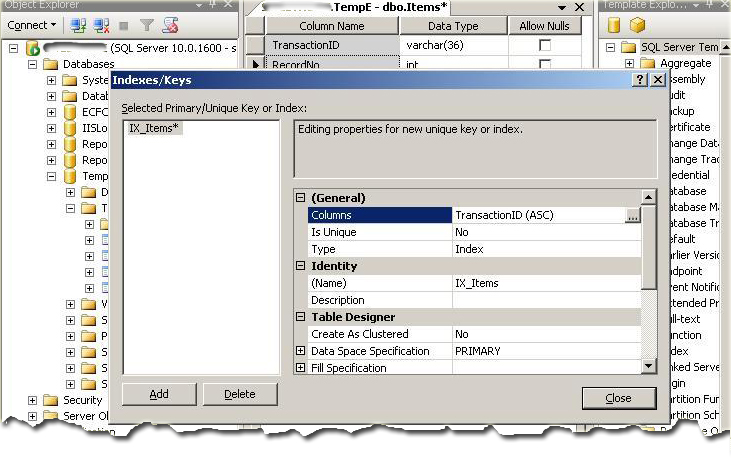
  4. Now you just select the column from the general properties as shown in figure 3, and add the specify column short order of the index.
    Figure 4 (How to set a Clustered Index)
    You can configure the index as clustered or non-clustered from the Create as clustered properties. Figure 4 shows the configuration of clustered or non-clustered indexes by default.
So we discussed how to create an index by using SQL Server Table Designer. Let’s try to create an index by using Transact-SQL.
7.2 Creating an Index – Transact-SQL
If we want to create an index by using Transact – SQL , we must know the columns detail for index creation. A sample syntax is given below.
Syntax
CREATE INDEX <index_type> <index_name> ON <table_name> (
<column_name1> <index_order>,
<column_name2> <index_order>,
)  
 
CREATE UNIQUE INDEX <index_type> <index_name> ON <table_name> (
<column_name1> <index_order>,
<column_name2> <index_order>,
) 
7.3 Drop an Index
Removes one or more indexes from the current database.
The DROP INDEX statement does not apply to indexes created by defining PRIMARY KEY or UNIQUE constraints (created by using the PRIMARY KEY or UNIQUE options of either the CREATE TABLE or ALTER TABLE statements, respectively). For more information about PRIMARY or UNIQUE KEY constraints, see "CREATE TABLE" or "ALTER TABLE" in this volume.
Syntax
DROP INDEX 'table.index | view.index' [ ,...n ] 
More information about drop indexes can be found at this link.

8. Index and Statistics

When retrieving data, SQL Server obviously has to make some decisions as to the best way to get to data and return it to the query requesting it. So SQL Server has some basic information to make sensible and accurate choices. This is where statistics comes in. SQL Server keeps statistics on each column, which are updated over a period of time and over a number of inserts or modifications.
More information about indexes and statistics can be found at this link.

9. Summary

In this article, I tried to cover SQL table indexing. I discussed why we use indexes and how they are used to quick and efficiently retrieve the data stored in the table. I also discussed various types of indexes, how to create / drop index, index uniqueness and index statistics as well.
I hope that this article will be helpful to you. Enjoy!

10. References

  • SQL Server books online
  • Microsoft Development Network (MSDN)
  • SQL Server programming by Robin

Sql Server - How to write a Stored procedure in Sql server

Stored Procedure:- Stored Procedure In Sql server can be defined as the set of logically group of sql statement which are grouped to perform a specific task. There are many benefits of using a stored procedure. The main benefit of using a stored procedure is that it increases the performance of the database.The other benefits of using the Stored Procedure is given below:-

Benefits of using the Stored Procedure

  1. One of the main benefit of using the Stored procedure is that it reduces the amount of information sent to the database server. It can become more important benefit when the bandwidth of the network is less. Since if we send the sql query (statement)which is executing in a loop to the server through network and the network get disconnected then the execution of the sql statement don't returns the expected results, if the sql query is not used between Transaction statement and rollback statement is not used. 
  2. Compilation step is required only once when the stored procedure is created. Then after it does not required recompilation before executing unless it is modified and re utilizes the same execution plan whereas the sql statements needs to be compiled every time whenever it is sent for execution even if we send the same sql statement every time.
  3. It helps in re usability of the sql code because it can be used by multiple users and by multiple client since we needs to just call the stored procedure instead of writing the same sql statement every time. It helps in reduces the development time.
  4. Stored procedure is helpful in enhancing the security since we can grant permission to the user for executing the Stored procedure instead of giving the permission on the tables used in the Stored procedure.
  5. Sometime it is useful to use the database for storing the business logic in the form of stored procedure since it make it secure and if any change is needed in the business logic then we may only need to make changes in the stored procedure and not in the files contained on the web server.

How to write a Stored Procedure in SQL Server

Suppose there is a table called tbl_Students whose structure is given below:
CREATE TABLE  tbl_Students

(
    [Studentid] [int] IDENTITY(1,1) NOT NULL,
    [Firstname] [nvarchar](200) NOT  NULL,
    [Lastname] [nvarchar](200)  NULL,
    [Email] [nvarchar](100)  NULL
)

Support we insert the following data into the above table:-
Insert into tbl_Students (Firstname, lastname, Email)
 Values('Vivek', 'Johari', 'vivek@abc.com')

Insert into tbl_Students (Firstname, lastname, Email)
 Values('Pankaj', 'Kumar', 'pankaj@abc.com')

Insert into tbl_Students (Firstname, lastname, Email)
 Values('Amit', 'Singh', 'amit@abc.com')

Insert into tbl_Students (Firstname, lastname, Email)
 Values('Manish', 'Kumar', 'manish@abc.comm')

Insert into tbl_Students (Firstname, lastname, Email)
 Values('Abhishek', 'Singh', 'abhishek@abc.com')

Now, while writing a Stored Procedure, the first step will be to write the Create Procedure statement as the first statement,
Create Procedure Procedure-name 
(
Input parameters ,
Output Parameters (If required)
)
As
Begin
     Sql statement used in the stored procedure
End

Now, suppose we need to create a Stored Procedure which will returns a student name whose studentid is given as the input parameter to the stored procedure. Then the Stored Procedure will be:-
/*  Getstudentname is the name of the stored procedure*/

Create  PROCEDURE Getstudentname(

@studentid INT                   --Input parameter ,  Studentid of the student 

)
AS
BEGIN
SELECT Firstname+' '+Lastname FROM tbl_Students WHERE studentid=@studentid 
END

We can also collect the student name in the output parameter of the Stored Procedure.For Example:
/* 
GetstudentnameInOutputVariable is the name of the stored procedure which
uses output variable @Studentname to collect the student name returns by the
stored procedure
*/

Create  PROCEDURE GetstudentnameInOutputVariable
(

@studentid INT,                       --Input parameter ,  Studentid of the student
@studentname VARCHAR(200)  OUT        -- Out parameter declared with the help of OUT keyword
)
AS
BEGIN
SELECT @studentname= Firstname+' '+Lastname FROM tbl_Students WHERE studentid=@studentid
END

Note:-/* */ is used to write comments in one or multiple lines
-- is used to write comment in a single line

How to Alter a Stored Procedure in a Sql server:-

In SQL Server, a stored procedure can be modified with the help of the Alter keyword.Now if, we want to get student email address through the same procedure GetstudentnameInOutputVariable . So we need to modified it by adding one more output parameter " @StudentEmail " which is shown below:
/* 
Stored Procedure GetstudentnameInOutputVariable is modified to collect the
email address of the student with the help of the Alert Keyword
*/


Alter  PROCEDURE GetstudentnameInOutputVariable
(

@studentid INT,                   --Input parameter ,  Studentid of the student
@studentname VARCHAR (200) OUT,    -- Output parameter to collect the student name
@StudentEmail VARCHAR (200)OUT     -- Output Parameter to collect the student email
)
AS
BEGIN
SELECT @studentname= Firstname+' '+Lastname, 
    @StudentEmail=email FROM tbl_Students WHERE studentid=@studentid
END

Note: It is not necessary that a stored procedure will have to written. It can be the case when a stored procedure doesn't written any thing. For Example, a stored procedure can be used to Insert, delete or update a sql statement. For Example the below stored procedure is used tp insert value into the table tbl_students.
/*
This Stored procedure is used to Insert value into the table tbl_students. 
*/

Create Procedure InsertStudentrecord
(
 @StudentFirstName Varchar(200),
 @StudentLastName  Varchar(200),
 @StudentEmail     Varchar(50)
) 
As
 Begin
   Insert into tbl_Students (Firstname, lastname, Email)
   Values(@StudentFirstName, @StudentLastName,@StudentEmail)
 End

Execution of the Stored Procedure in SQL Server

Execution of the Stored Procedure which don't have a Output Parameter

A stored procedure is used in the Sql server with the help of the "Execute" or "Exec" Keyword. For Example, If we want to execute the stored procedure "Getstudentname", then we will use the following statement.
Execute Getstudentname 1
Exec Getstudentname 1

Execution of the Stored Procedure using the Output Parameter

If we want to execute the Stored procedure
"GetstudentnameInOutputVariable " , then we first need to declare the variable to collect the output values. For example
Declare @Studentname as nvarchar(200)   -- Declaring the variable to collect the Studentname
 
Declare @Studentemail as nvarchar(50)     -- Declaring the variable to collect the Studentemail
 
Execute GetstudentnameInOutputVariable 1 , @Studentname output, @Studentemail output
 
select @Studentname,@Studentemail      -- "Select" Statement is used to show the output from Procedure

Summary

In the end we can say that a Stored procedure not only enhancing the possibility of reusing the code and execution plan, but it also increases the performance of the database by reducing the traffic of the network by reducing the amount of information send over the network.